
This guide will help you on How to Configure Your Mount & Blade: Warband Server Name
Setting a custom server name is a simple way to make your Mount & Blade: Warband server easier for players to identify and find. Whether you're hosting a private server for friends or a public community server, choosing a clear and recognizable name can help establish your server's identity. In this guide, we'll show you how to configure your Mount & Blade: Warband server name and apply your changes through your server's configuration files.
Changing the Name of Your Mount & Blade: Warband Server
1. Log in to your Game Control Panel, then head over to your server service.
2. Before making any changes, stop the server by clicking the Stop button.

3. Navigate to the Configuration Files Task section.
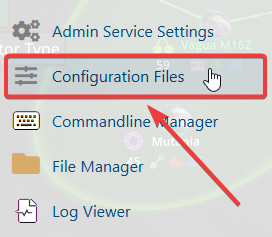
4. Depending on the game mode currently installed, select Text Editor to open its corresponding configuration file. Locate the set_server_name field and enter your preferred server name.

Please note that Mount & Blade: Warband does not support all special characters, including spaces, in server names. If your server does not appear in the server list, try removing unsupported characters and using a simpler server name.
5. When you’re done adjusting your settings, click Save to apply everything you’ve configured.

If you encounter any issues, please click here to contact our support team via a ticket for further assistance.
