

This guide will help you with how to Control Player Access with Whitelisting in your Colony Survival Server
Order a Colony Survival Server today with Ascend Servers
Controlling who can join your Colony Survival server is essential for keeping your world secure, stable, and tailored to the community you want to build. Whitelisting gives you direct control over player access by allowing only approved users to connect, preventing unwanted visitors and protecting your colony from griefing or accidental disruption. Whether you’re hosting a private group, managing a long‑term cooperative world, or simply tightening server security, enabling a whitelist ensures that only trusted players can participate. This guide explains how to set up and manage whitelisting on your Colony Survival server so you can maintain a safe, organized, and well‑regulated gameplay environment.
Configuring Whitelisting on Your Colony Survival Server
1. Log in to your Game Control Panel, then head over to your server service.
2. Before making any changes, stop the server by clicking the Stop button.

3. Navigate to the Configuration Files Task section.
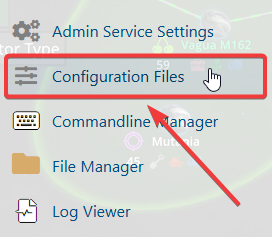
4. In the Configuration Files section, locate the whitelist.txt file and open it to begin adding approved players.

Add the SteamID64 of each player you want to whitelist, placing one ID per line.
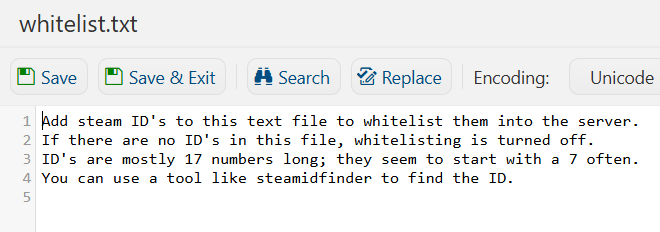
5. After making changes, click the Save button to apply.

If you encounter any issues, please click here to contact our support team via a ticket for further assistance.
