
This guide will help you How to Move Your DayZ Server to the Experimental Version
Keeping your DayZ server up to date with the latest features and improvements is an important part of providing players with a fresh and engaging experience. Before major updates are released to the stable version, Bohemia Interactive often makes them available through the Experimental branch, allowing server owners and players to test new mechanics, changes, and fixes ahead of time. Moving your DayZ server to the Experimental version gives you early access to upcoming content while helping identify potential issues before the official release. However, switching branches requires careful preparation, as Experimental updates may introduce compatibility problems, require server file changes, or affect existing mods and configurations. This guide will walk you through the process of transferring your DayZ server from the Stable version to the Experimental version, including the necessary steps to update your server files, adjust settings, and ensure everything is ready for testing. Whether you are managing a private server for friends or running a larger community server, following these steps will help make the transition as smooth as possible.
Updating your DayZ Server to Experimental Branch
1. Log in to your Game Control Panel, then head over to your server service.
2. Before making any changes, stop the server by clicking the Stop button.

3. Navigate to the Server Updater Tab.
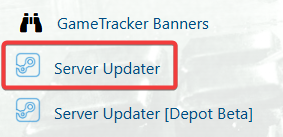
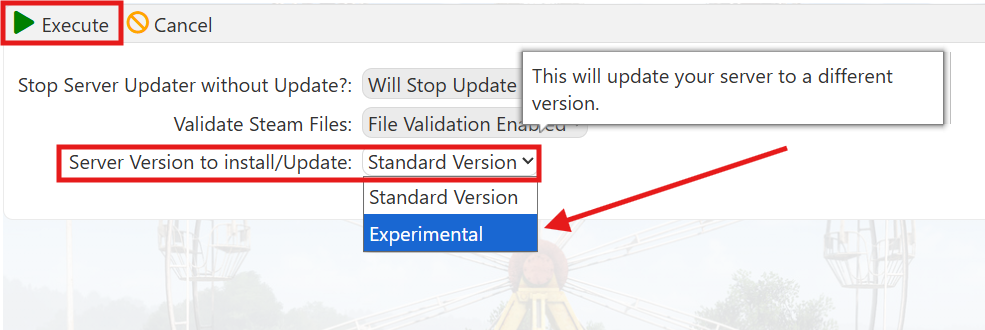
4. In the Server Updater, locate the Server Version to Install/Update option, then open the dropdown menu and select Experimental to switch your server to the Experimental branch.
5. Click the Execute button to begin the installation process, then wait for the update to complete before proceeding.
Once the process is complete, start your server and connect to the Experimental version to begin playing.
If you encounter any issues, please click here to contact our support team via a ticket for further assistance.
