
This guide will help you How to Install and Switch to the Chernarus Map on Your DayZ Server
Whether you're moving away from a custom terrain or returning to the iconic vanilla experience, switching your DayZ server to the Chernarus map is a straightforward process. As the original and most recognizable map in DayZ, Chernarus offers a balanced mix of sprawling forests, abandoned towns, military zones, and survival-focused gameplay that many players know and enjoy. In this guide, you'll learn how to install and switch your DayZ server to the Chernarus map. We'll cover the necessary server configuration changes, verify that the correct mission files are being used, and walk through the steps required to launch your server successfully. By the end of this tutorial, your server will be ready to host players on Chernarus with minimal downtime.
Switching Your DayZ Server Map to Chernarus
1. Log in to your Game Control Panel, then head over to your server service.
2. Before making any changes, stop the server by clicking the Stop button.

3. Navigate to the Configuration Files Tab.
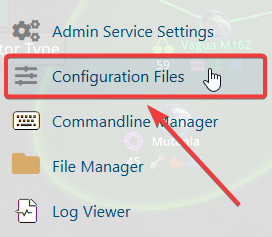
4. In the configuration files section, locate the serverDZ.cfg file, then click Text Editor next to it to open and edit the file.

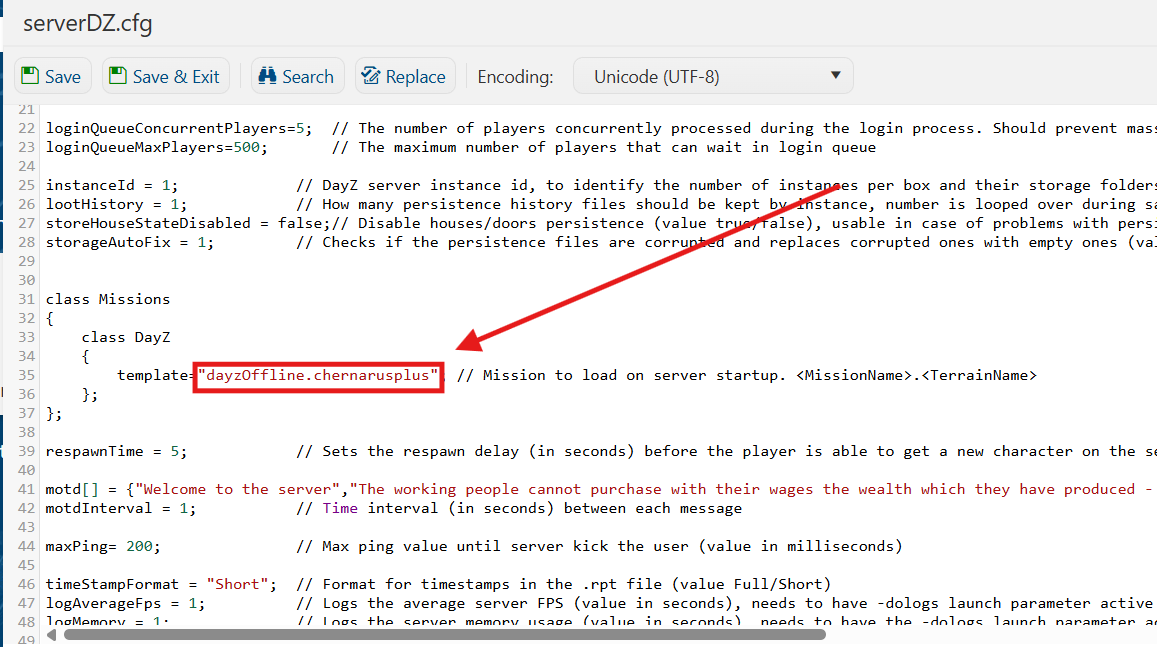
5. Once the configuration file opens, find the class Mission section. Replace the existing Mission parameter value with:
"dayzOffline.chernarusplus"
This will set your DayZ server to load the Chernarus map.
6. After editing, click the Save button to apply the changes to your server.

7. Start your server. Once the server has successfully started, you can join and enjoy playing on the Chernarus map.
If you encounter any issues, please click here to contact our support team via a ticket for further assistance.
