

This guide will help you install and Switch Your DayZ Server to the Sakhal Map
Looking to give your DayZ server a fresh survival experience? The Sakhal map, introduced with the DayZ Frostline expansion, brings players to a frozen volcanic archipelago where harsh weather, snow-covered landscapes, and unforgiving survival mechanics create an entirely new challenge. Unlike the familiar forests of Chernarus or the countryside of Livonia, Sakhal demands careful resource management, warm clothing, and constant preparation against the freezing environment. Whether you're launching a brand-new server or switching an existing one, moving to the Sakhal map requires more than simply changing the map name. You'll need to install the required DLC server files, update your server configuration, generate or migrate the appropriate mission files, and verify that your startup parameters are correctly configured. If you're running mods, you'll also want to ensure they're compatible with Sakhal to avoid startup errors or gameplay issues. In this guide, we'll walk you through the complete process of installing and switching your DayZ server to the Sakhal map. By the end, your server will be ready to host players in one of DayZ's most challenging and immersive survival environments.
Switching Your DayZ Server to the Sakhal Map
1. Log in to your Game Control Panel, then head over to your server service.
2. Before making any changes, stop the server by clicking the Stop button.

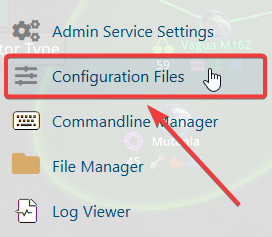
3. Navigate to the Configuration Files Tab.
4. In the configuration files section, locate the serverDZ.cfg file, then click Text Editor next to it to open and edit the file.

5. Once the configuration file opens, find the class Mission section. Replace the existing Mission parameter value with:
"dayzOffline.sakhal"
This will set your DayZ server to load the Sakhal map.
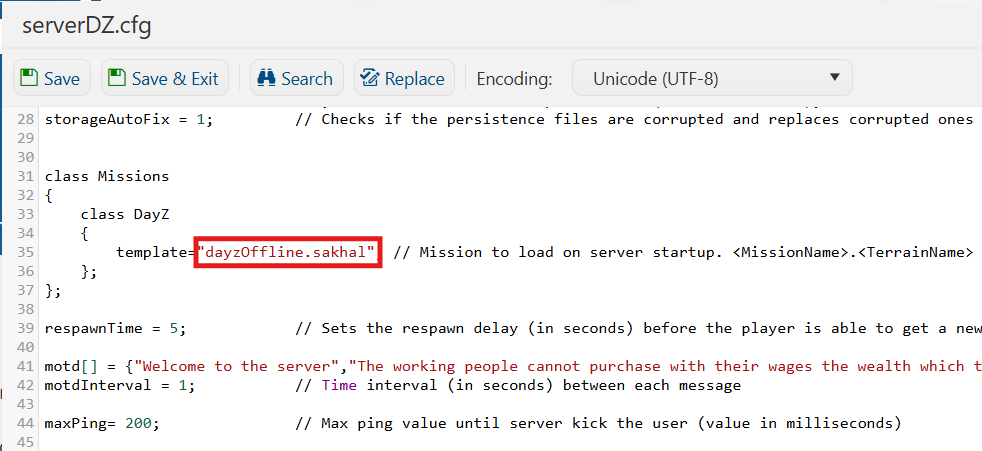
6. After editing, click the Save button to apply the changes to your server.

7. Start your server. Once the server has successfully started, you can join and enjoy playing on the Sakhal map.
If you encounter any issues, please click here to contact our support team via a ticket for further assistance.
