

Difficulty settings in Enshrouded define how punishing the world feels, shaping everything from combat intensity to overall survival pressure. Fine‑tuning these values lets you craft a gameplay experience that matches your community’s preferences, whether you want a relaxed, exploration‑focused server or a demanding environment that pushes players to stay alert and resourceful. This guide walks you through how to adjust and refine your Enshrouded server’s difficulty settings. You’ll learn where these options are located, what each parameter affects, and how different configurations can dramatically change the pace and challenge of your world. With a few targeted adjustments, you can create a difficulty profile that feels balanced, engaging, and perfectly aligned with the experience you want your players to have.
Customizing Difficulty Settings for Your Enshrouded Server
1. Log in to your Game Control Panel, then head over to your server service.
2. Before making any changes, stop the server by clicking the Stop button.

3. Navigate to the Configuration Files Task section.
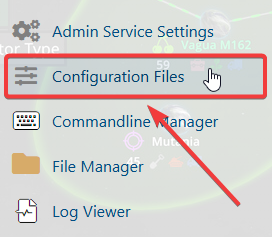
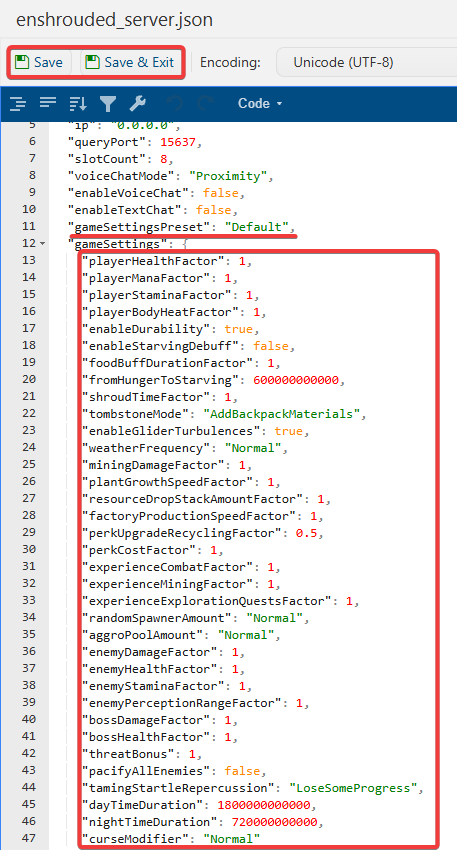
4. From the Configuration Files, select enshrouded_server.json and open it with the Text Editor located beside the Config Editor.

5. In the Config Editor, locate the World Difficulty setting and adjust it to match your preferred challenge level.
| World Difficulty | Description |
| Default | Normal |
| Relax | Casual |
| Hard | More Enemies/Aggro |
| Survival | More Survival Mechanics |
| Custom | Required for Customized Modifers |
6. After making changes, click the Save button to apply.

If you encounter any issues, please click here to contact our support team via a ticket for further assistance.
