

Admin controls give you full authority over your Enshrouded server, allowing you to manage settings, moderate players, and access powerful commands that shape the world and gameplay experience. Whether you’re running a private community or hosting a public server, enabling admin access is the first step toward maintaining stability, enforcing rules, and customizing your environment. This guide walks you through how to enable admin controls for your Enshrouded server. You’ll learn where to configure admin permissions, how authentication works, and what tools become available once admin access is active. With just a few quick adjustments, you’ll have complete control over your server and the ability to manage it exactly the way you want.
Configuring Admin Access on Your Enshrouded Server
1. Log in to your Game Control Panel, then head over to your server service.
2. Before making any changes, stop the server by clicking the Stop button.

3. Navigate to the Configuration Files Task section.
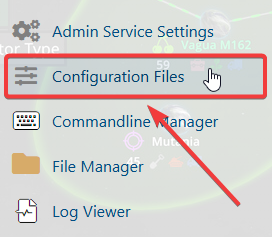
4. From the Configuration Files, select enshrouded_server.json and open it with the Text Editor located beside the Config Editor.

5. In the Config Editor, locate the userGroups line and create an Admin role. Set the cankickorban option from False to True so the server recognizes it as an admin group.
Make sure to remember the password you assign to this Admin role.
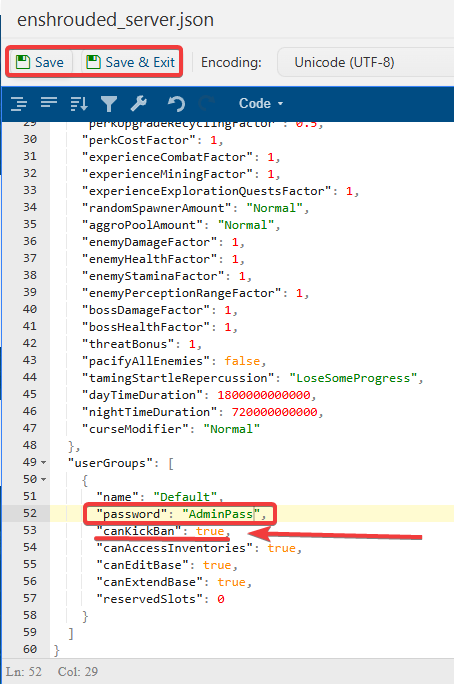
6. After making changes, click the Save button to apply.

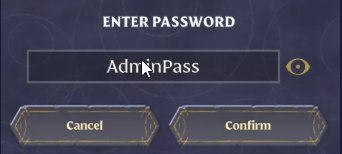
7. When joining the server, enter the Admin Role password you created in Step 5 instead of the standard server password.
If you encounter any issues, please click here to contact our support team via a ticket for further assistance.
