

Customizing XP gain on your Enshrouded server is one of the fastest ways to shape how quickly players progress through the world. Whether you want a slower, more survival‑focused experience or a faster, action‑heavy pace, adjusting experience rates lets you tune the game to match your community’s preferred style. This introduction walks you through what XP gain controls, why you might want to modify it, and how to apply the right settings so your server delivers the progression curve you envision.
Configuring Experience Rates in Enshrouded
1. Log in to your Game Control Panel, then head over to your server service.
2. Before making any changes, stop the server by clicking the Stop button.

3. Navigate to the Configuration Files Task section.
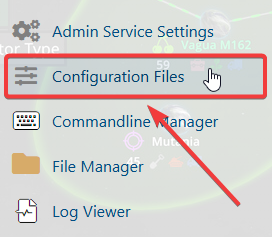
4. From the Configuration Files, select enshrouded_server.json and open it with the Text Editor located beside the Config Editor.

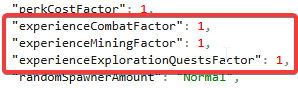
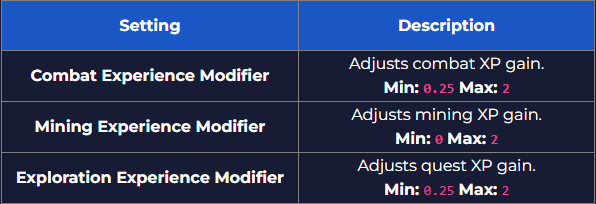
5. In the Config Editor, find the experienceCombatFactor, experienceMiningFactor, and experienceExplorationQuestFactor entries, then adjust each one to align with your desired XP progression rate.
6. After making changes, click the Save button to apply.

If you encounter any issues, please click here to contact our support team via a ticket for further assistance.
