

The day–night cycle plays a major role in how players experience the world of Enshrouded. Adjusting day length and overall time progression allows you to control the rhythm of exploration, combat, resource gathering, and Shroud encounters. Whether you want longer days for building and travel, extended nights for a more challenging atmosphere, or a balanced cycle that fits your community’s pace, customizing these settings gives you full control over how time flows on your server. This introduction explains what each time‑related setting affects and how to configure them to create the ideal gameplay environment.
Customizing Day/Night Cycle Length on Your Enshrouded Server
1. Log in to your Game Control Panel, then head over to your server service.
2. Before making any changes, stop the server by clicking the Stop button.

3. Navigate to the Configuration Files Task section.
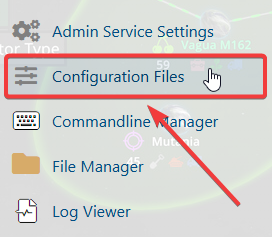
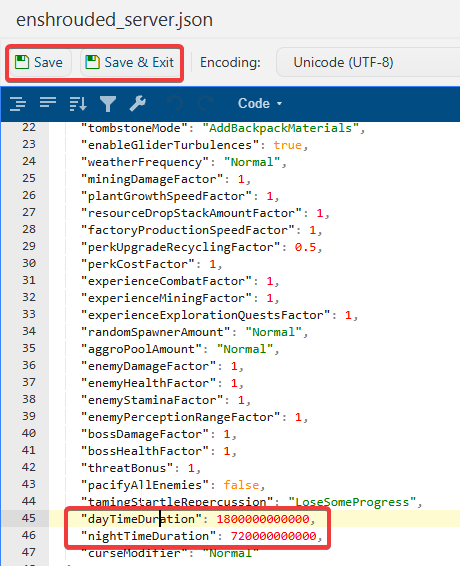
4. From the Configuration Files, select enshrouded_server.json and open it with the Text Editor located beside the Config Editor.

5. In the Config Editor, locate the Night & Day Duration setting and adjust it to your preferred cycle length. Valid values range from 120000000000 (2 minutes) to 3600000000000 (60 minutes).
| Minutes |
Nanoseconds |
| 2 min | 120000000000 |
| 5 min | 300000000000 |
| 10 min | 600000000000 |
| 20 min | 1200000000000 |
| 30 min | 1800000000000 |
| 60 min | 3600000000000 |
6. After making changes, click the Save button to apply.

If you encounter any issues, please click here to contact our support team via a ticket for further assistance.
