

World Custom Modifiers give you deep control over how Enshrouded’s world behaves, allowing you to tailor everything from resource abundance to enemy difficulty and environmental effects. By adjusting these values, you can create a world that feels more punishing, more relaxed, or perfectly balanced for your community’s preferred playstyle. Whether you’re shaping a hardcore survival experience or a more exploration‑friendly environment, fine‑tuning these modifiers lets you define the core identity of your server. This introduction outlines what these settings influence and how adjusting them can transform the overall gameplay experience.
Customizing World Modifier Settings on Your Enshrouded Server
1. Log in to your Game Control Panel, then head over to your server service.
2. Before making any changes, stop the server by clicking the Stop button.

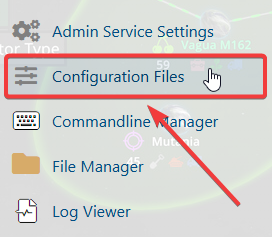
3. Navigate to the Configuration Files Task section.
4. From the Configuration Files, select enshrouded_server.json and open it with the Text Editor located beside the Config Editor.

5. In the Configuration Files, set gameSettingsPreset or World Difficulty to Custom to enable full control over your world modifiers.
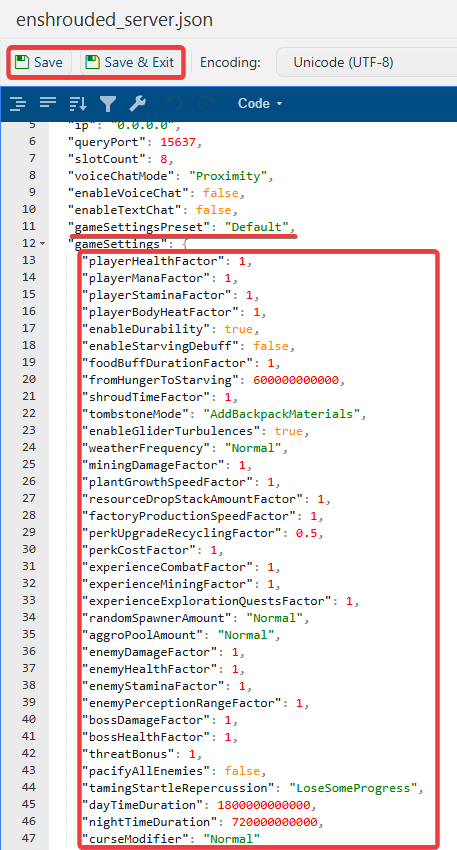
Custom Modifiers
| Setting | Description | Values |
| Enable Text Chat | Allows switching text chat completely off or enabling it. | Enable | Disable |
| Enable VoiceChat | If enabled, Proximity/Global Voicechat will be active | Enable | Disable |
| Voice Chat Mode | Allows switching between the proximity voice chat and the global, server-wide voice chat | Proximity | Global |
| Save Directory | Where the save game will generate. | N/A |
| Player Health Factor | Adjusts player health scale. | Min: 0.25Max: 4 |
| Player Mana Factor | Adjusts player mana scale. | Min: 0.25Max: 4 |
| Player Stamina Factor | Adjusts player stamina scale. | Min: 0.25Max: 4 |
| Enable Weapon Durability | Prevents weapons from breaking if false. | Values:true | false |
| Enable Starving Debuff | Enables health loss when starving. | Values:true | false |
| Food Buff Duration | Adjusts food buff duration. | Min: 0.5Max: 2 |
| Hungry State Duration | Time before starvation begins. | Min: 300000000000(5 Minutes) Max: 1200000000000(20 minutes) |
|
Shroud Time Duration Modifier |
Adjusts time spent in the Shroud. | Min: 0.5Max: 2 |
| Tombstone Mode Option | Determines item loss on death. | Values: - AddBackpackMaterials- Everything- NoTombstone |
| Mining Damage Factor | Adjusts mining yield. | Min: 0.5Max: 2 |
| Plant Growth Speed | Adjusts plant growth speed. | Min: 0.25Max: 2 |
| Resource Gain Modifier | Adjusts resource stack sizes. | Min: 0.25Max: 2 |
| Workstation Effectiveness | Reduces production time. | Min: 0.25Max: 2 |
| Weapon Recycling Yield Modifier | Rune yield when recycling weapons. | Min: 0Max: 1 |
| Weapon Upgrading Costs | Adjusts rune upgrade costs. | Min: 0.25Max: 2 |
| Combat Experience Modifier | Adjusts combat XP gain. | Min: 0.25Max: 2 |
| Mining Experience Modifier | Adjusts mining XP gain. | Min: 0Max: 2 |
| Exploration Experience Modifier | Adjusts quest XP gain. | Min: 0.25Max: 2 |
| randomSpawnerAmount | Controls the amount of enemies in the world. | Values:Few | Normal | Many | Extreme |
| Simultaneous Enemy Attacks | Controls enemy attack count. | Values:Few | Normal | Many | Extreme |
| Enemy Damage | Adjusts enemy damage. (Excludes Bosses) | Min: 0.25Max: 5 |
| Enemy Health | Adjusts enemy health. (Excludes Bosses) | Min: 0.25Max: 4 |
| Enemy Stun Modifier | Adjusts enemy stun resistance. (Excludes Bosses) | Min: 0.5Max: 2 |
| Enemy Perception Modifier | Adjusts enemy perception range. (Excludes Bosses) | Min: 0.5Max: 2 |
| Boss Damage Modifier | Scales the damage of boss attacks. | Min: 0.5Max: 2 |
| Boss Health Modifier | Scales all health of bosses by this value. | Min: 0.2Max: 5 |
| Enemy Attacks Modifier | Adjusts enemy attack frequency. (Excludes Bosses) | Min: 0.25Max: 4 |
|
Pacified Enemies |
Enemies won’t attack if true. (Excludes Bosses) | Values:true | false |
| Daytime Duration | Adjusts day length. (Measured in Nanoseconds) | Min: 120000000000(2 Minutes) Max: 3600000000000(60 Minutes) |
| Nighttime Duration | Adjusts night length. (Measured in Nanoseconds) | Min: 120000000000(2 Minutes) Max: 3600000000000(60 Minutes) |
6. After making changes, click the Save button to apply.

If you encounter any issues, please click here to contact our support team via a ticket for further assistance.
