
Removing death penalties on your Enshrouded server is a simple but impactful way to create a more relaxed, exploration‑friendly experience for your players. Whether you’re hosting a casual community, helping new players learn the game, or just want to eliminate the frustration of losing resources after a tough fight, adjusting this setting gives everyone more freedom to experiment and enjoy the world without setbacks. This guide walks you through the exact steps to disable death penalties, explains what the change affects, and helps you tailor the gameplay to match the tone you want for your server.
Configuring Death Penalty Settings on Your Enshrouded Server
1. Log in to your Game Control Panel, then head over to your server service.
2. Before making any changes, stop the server by clicking the Stop button.

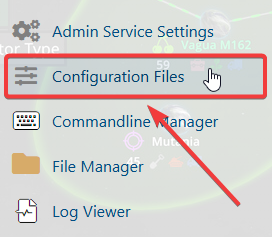
3. Navigate to the Configuration Files Task section.
4. From the Configuration Files, select enshrouded_server.json and open it with the Text Editor located beside the Config Editor.

5. Within the Config Editor, look for the tombstoneMode setting and update it by changing No Tombstone to Drop Nothing on Death.

6. After making changes, click the Save button to apply.

If you encounter any issues, please click here to contact our support team via a ticket for further assistance.
