

Removing weapon durability loss on your Enshrouded server is a great way to create a smoother, more combat‑focused experience for your players. By disabling durability damage, weapons no longer break or require constant repairs, allowing players to explore, fight, and progress without worrying about maintenance or resource costs. This adjustment is especially useful for community servers, casual playthroughs, or any environment where you want combat to feel more fluid and less punishing. In this guide, you’ll learn exactly how to turn off weapon durability loss and ensure your server delivers a more streamlined and enjoyable gameplay experience.
Configuring Weapon Durability Settings on Your Enshrouded Server
1. Log in to your Game Control Panel, then head over to your server service.
2. Before making any changes, stop the server by clicking the Stop button.

3. Navigate to the Configuration Files Task section.
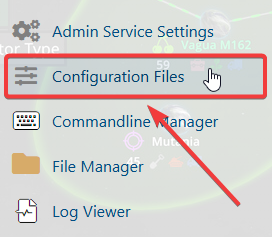
4. From the Configuration Files, select enshrouded_server.json and open it with the Text Editor located beside the Config Editor.

5. Within the Config Editor, look for the enabledurability setting and switch it to false to disable durability loss.
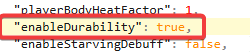
6. After making changes, click the Save button to apply.

If you encounter any issues, please click here to contact our support team via a ticket for further assistance.
