

Activating Peaceful Mode on your Enshrouded server is an excellent way to create a relaxed, exploration‑focused environment where players can enjoy the world without the pressure of combat. With hostile creatures disabled, your community can focus on building, gathering, and adventuring at their own pace. This mode is ideal for creative servers, beginner‑friendly worlds, or groups who prefer a calm, cooperative experience. In this guide, you’ll learn how to enable Peaceful Mode and tailor your server to support a more laid‑back style of gameplay.
Configuring Peaceful Mode Settings on Your Enshrouded Server
1. Log in to your Game Control Panel, then head over to your server service.
2. Before making any changes, stop the server by clicking the Stop button.

3. Navigate to the Configuration Files Task section.
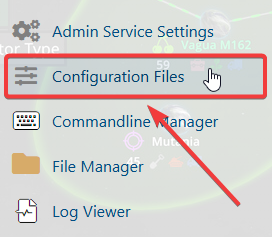
4. From the Configuration Files, select enshrouded_server.json and open it with the Text Editor located beside the Config Editor.

5. Within the Config Editor, look for the pacifyAllEnemies setting and switch it to TRUE to pacify all enemies.
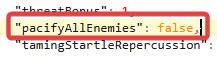
6. After making changes, click the Save button to apply.

If you encounter any issues, please click here to contact our support team via a ticket for further assistance.
