

This guide will help you learn Customizing Death Penalty Settings on your Hytale Server.
Click here to order your Hytale server with Ascend Servers today!
The death penalty system in Hytale plays a crucial role in shaping the overall gameplay experience on your server. It determines what happens when players die, whether they keep their inventory, lose items, or face harsher consequences. By customizing these settings, you can fine-tune the balance between challenge and accessibility, tailoring the rules to match your community’s playstyle. For example, a casual server might allow players to keep their items after death to encourage exploration, while a hardcore server could enforce stricter penalties to heighten the sense of risk and survival. Adjusting these mechanics not only impacts individual player progression but also defines the identity of your server, making it unique and aligned with your vision. In this guide, we’ll walk through how to locate and edit death penalty settings, explain the different options available, and share best practices for choosing the right configuration. Whether you’re aiming for a relaxed adventure or a high-stakes survival challenge, mastering these settings will help you create a Hytale server that feels just right for your community.
Configuring Death Penalty Settings in Hytale
1. Log in to your Game Control Panel and navigate to your service.
2. Before making any modifications, stop the server from running by clicking the Stop button.

3. Navigate to the File Managers Tab.
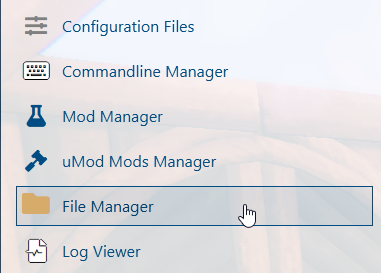
4. Go to the directory /universe/worlds/(your world) and open the config.json file.
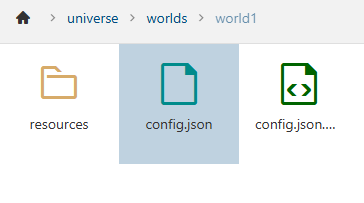
(Note: If a 'Death' entry already exists, skip ahead to Step 7.)
5. In the config.json file, locate the GameplayConfig line and press Enter to create a new line beneath it.
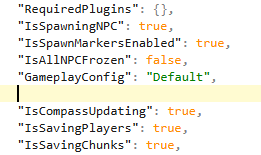
Enter the following command:
"Death": {
"RespawnController": {
"Type": "HomeOrSpawnPoint"
},
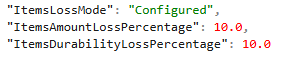
"ItemsLossMode": "Configured",
"ItemsAmountLossPercentage": 10.0,
"ItemsDurabilityLossPercentage": 10.0
},
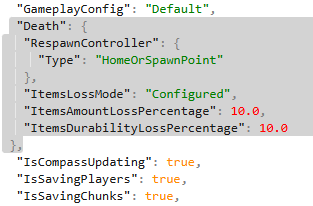
6. Next, adjust the ItemLossMode settings in the configuration file to match your preferred rules.
| Setting | Description |
ItemsLossMode |
Sets the death penalty to
|
ItemsAmountLossPercentage |
Sets the number of items lost upon death. |
ItemsDurabilityLossPercentage |
Sets how much item durability is lowered on death. |
7. After making your edits, click Save to apply the changes to the server.

If you encounter any issues, please click here to contact our support team via a ticket for further assistance.