

This guide will help you learn how to enable and manage Whitelists on your Hytale Server
Click here to order your Hytale server with Ascend Servers today!
Keeping your Hytale server secure and welcoming to the right players is essential for building a positive community. One of the most effective tools for controlling access is the whitelist. By enabling and managing a whitelist, you decide exactly who can join your server, preventing unwanted visitors while ensuring trusted players always have access. In this guide, we’ll walk through the steps to enable whitelisting, add or remove players, and manage permissions with ease. You’ll learn how to protect your server from random intrusions, maintain a safe environment, and customize access so your server reflects the community you want to build.
Enabling and Managing Whitelists on Your Hytale Server
1. Log in to your Game Control Panel and navigate to your service.
2. Navigate to the Web-Console Tab.

3. From the Web‑Console tab, type and execute the following command to apply changes.
whitelist on
You can disable the whitelist at any time by entering the following command:
whitelist off
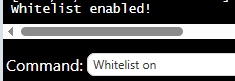
When the whitelist is enabled, only approved players on the list and server admins will be able to join.
Managing the Whitelist
Once the whitelist is enabled, you can easily add or remove players at any time to manage access to the server.
Adding a player from the whitelist:
whitelist add <playername>
Removing a player from the whitelist:
whitelist remove <playername>
Changes take effect instantly, meaning players will gain or lose access the moment the command is executed.

Enabling a whitelist is one of the simplest and most effective ways to secure your Hytale server, giving you complete control over who can join and ensuring a safe, trusted community.
If you encounter any issues, please click here to contact our support team via a ticket for further assistance.