

This guide will show you how to change the scenario ID on your Arma Reforger Server.
Order Your ArmA Reforger Server Today with Ascend Servers
This short guide explains how to change the Scenario ID on your Arma Reforger server so your server loads a different scenario or map without breaking player progress. It covers where the Scenario ID is stored, how to edit the scenario or server configuration safely, and the correct restart steps to apply the change. Before you begin, back up your server files and scenario data, and ensure you have access to the server’s configuration files and restart controls. Follow the steps carefully to avoid downtime or unintended data loss.
Switching Scenario IDs on an Arma Reforger Server
1. Log in to your Game Control Panel, then head over to your server service.
2. Before making any changes, stop the server by clicking the Stop button.

3. Navigate to the Configuration Files Task section.
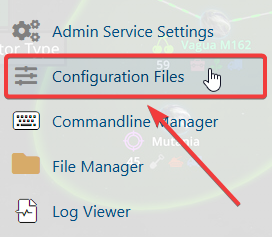
4. From Configuration Files, click server_config.json and open it in the Text Editor.

5. In the Scenario ID setting, paste or type your new scenario ID to replace the existing one.
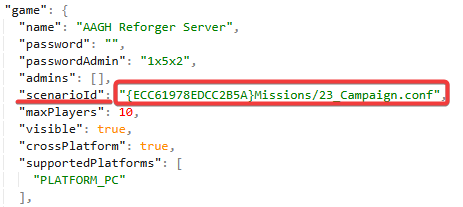
Choose one of these vanilla Scenario IDs for your server:
| Scenario Name | Scenario ID & Path |
|---|---|
| Tutorial | {90F086877C27B6F6}Missions/99_Tutorial.conf |
| Game Master - Arland | {2BBBE828037C6F4B}Missions/22_GM_Arland.conf |
| Game Master - Everon | {59AD59368755F41A}Missions/21_GM_Eden.conf |
| Conflict - Everon | {ECC61978EDCC2B5A}Missions/23_Campaign.conf |
| Conflict - Arland | {C41618FD18E9D714}Missions/23_Campaign_Arland.conf |
| Conflict - St. Philippe & Morton | {C700DB41F0C546E1}Missions/23_Campaign_NorthCentral.conf |
| Conflict - Morton & St. Pierre | {28802845ADA64D52}Missions/23_Campaign_SWCoast.conf |
| Combat Ops - Arland | {DAA03C6E6099D50F}Missions/24_CombatOps.conf |
| Combat Ops - Everon | {DFAC5FABD11F2390}Missions/26_CombatOpsEveron.conf |
| Capture & Hold: Briars | {3F2E005F43DBD2F8}Missions/CAH_Briars_Coast.conf |
| Capture & Hold: Montfort Castle | {F1A1BEA67132113E}Missions/CAH_Castle.conf |
| Capture & Hold: Concrete Plant | {589945FB9FA7B97D}Missions/CAH_Concrete_Plant.conf |
You can also use modded scenario IDs found in the Arma Workshop.
6. After editing, click the Save button to apply the new Scenario ID.

If you encounter any issues, please click here to contact our support team via a ticket for further assistance.
