

This guide will show you how to Activate Crossplay on your Arma Reforger Dedicated Server
Order Your ArmA Reforger Server Today with Ascend Servers
This guide walks you through the steps needed to activate crossplay on your Arma Reforger dedicated server, allowing players on different platforms to join the same game seamlessly. You’ll learn where to find the crossplay settings, how to enable supported platforms, and what requirements or limitations to keep in mind, especially when running mods or custom configurations. With a few quick adjustments and a server restart, you’ll have cross‑platform play enabled and ready for your community.
Switching Crossplay for Arma Reforger Servers
1. Log in to your Game Control Panel, then head over to your server service.
2. Before making any changes, stop the server by clicking the Stop button.

3. Navigate to the Configuration Files Task section.
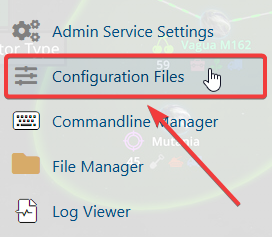
4. From Configuration Files, click server_config.json and open it in the Config Editor.

5. Find the Supported Platform setting and select the platforms you want to play on.
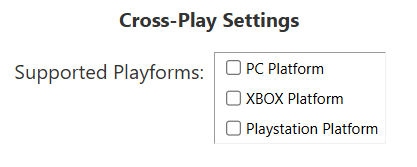
6. After making changes, click Save button to apply.

If you encounter any issues, please click here to contact our support team via a ticket for further assistance.
