

This guide will show you how to move an Arma Reforger Server to the Experimental Build
Order Your ArmA Reforger Server Today with Ascend Servers
Moving your Arma Reforger server to the Experimental build lets you test upcoming features, engine changes, and gameplay updates before they reach the stable branch. This process is straightforward, but it does require adjusting your server’s installation and update settings to ensure it pulls the correct branch from Steam. This introduction sets the stage for a clear, step‑by‑step walkthrough so you can switch your server safely, verify the installation, and get back online with the latest experimental content.
Switch Your Arma Reforger Server to the Experimental Branch
1. Log in to your Game Control Panel, then head over to your server service.
2. Navigate to the Server Updater Task section.
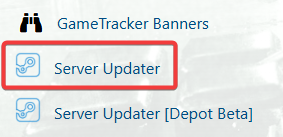
3. In the Server Updater, ensure “Experimental Version” is selected, then click Execute.
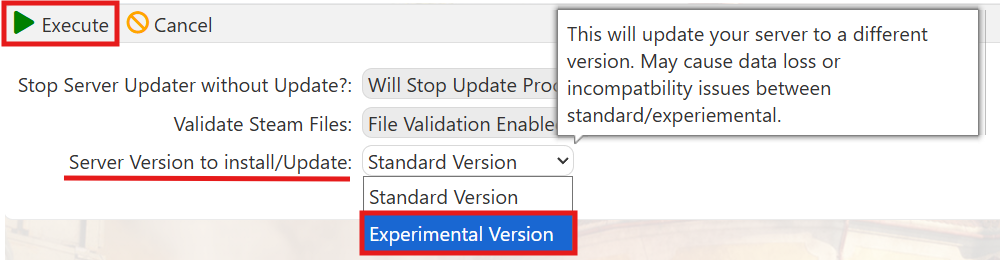
Wait for the process to finish, and once it completes, your server will be running on the Experimental branch.
If you encounter any issues, please click here to contact our support team via a ticket for further assistance.
