

This guide will help you with how to Change Maps on your Killing Floor 2 Server
Take Your Killing Floor 2 Experience to the Next Level with Ascend Servers
Changing maps on your Killing Floor 2 server is a simple way to keep your gameplay sessions fresh or quickly switch to a different map when your current one is no longer suitable. Whether you're managing a private server for friends or running a larger community server, you can change the active map using the server console or command line. In this guide, we'll walk you through the steps to change maps on your Killing Floor 2 server, including the commands you need and how to make sure the new map loads correctly.
Switching Maps on Your Killing Floor 2 Server
1. Log in to your Game Control Panel, then head over to your server service.
2. Before making any changes, stop the server by clicking the Stop button.

3. Navigate to the Commandline Manager Task section.
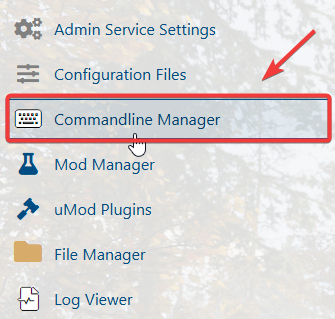
4. From the Commandline Manager, locate the Default command line, then click Modify on the right to edit its settings.
5. Find the Startup Level field and select the map you want your server to load.
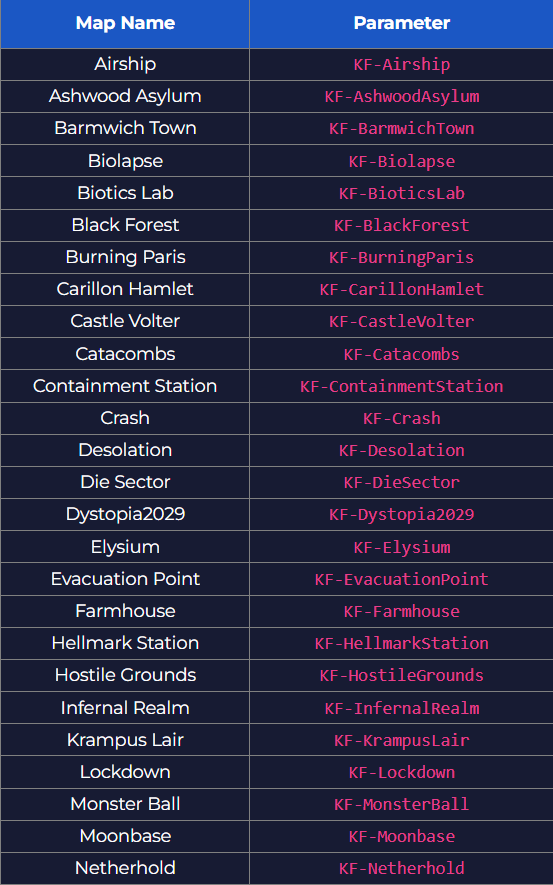
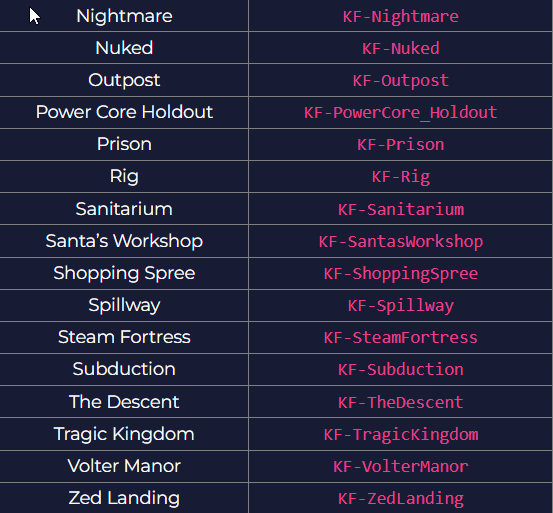
6. When you're finished, click Apply to save your changes, then start the server.
If you encounter any issues, please click here to contact our support team via a ticket for further assistance.
